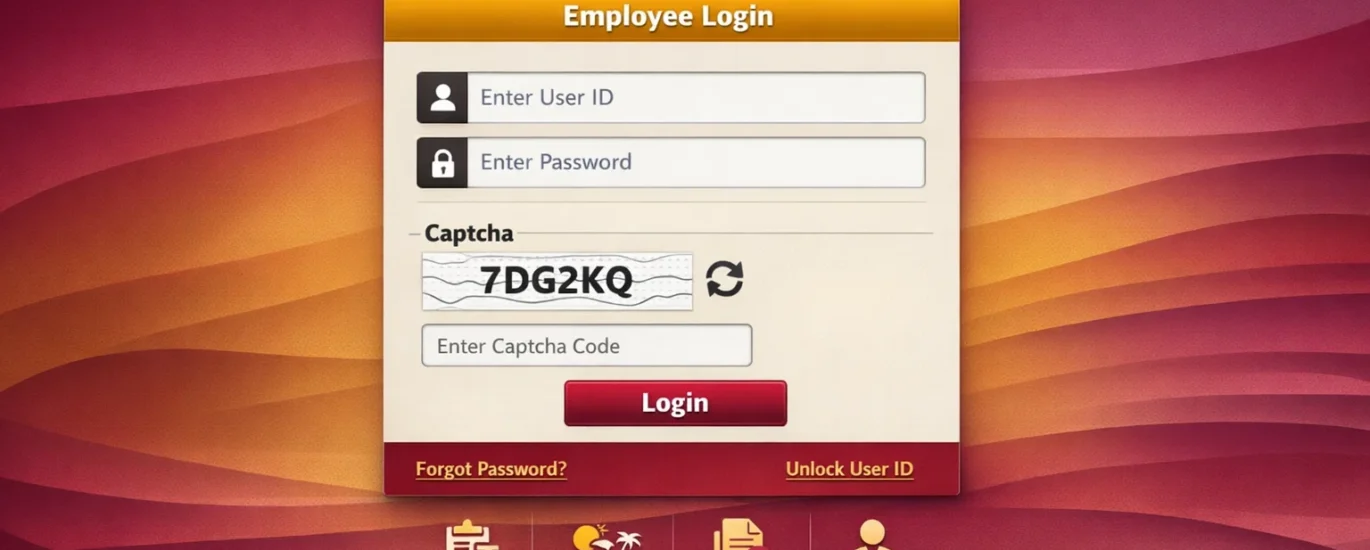
Punjab National Bank (PNB) is one of India’s largest public sector banks, with thousands of employees across the country. To manage employee-related services efficiently, PNB has developed the HRMS (Human Resource Management System) portal. In this article, we will cover everything you need to know about PNB HRMS login — from step-by-step login instructions to password reset, registration, and troubleshooting common issues.
Table of Contents
What is PNB HRMS Portal?
PNB HRMS (Human Resource Management System) is an online portal developed by Punjab National Bank for its employees. Through this portal, employees can access a wide range of HR-related services from anywhere, at any time.
The official PNB HRMS portal URL is: hrms.pnb.co.in
Key services available on the PNB HRMS portal include:
- Salary slip download
- Leave application and management
- Service book records
- Provident Fund (PF) details
- Transfer and posting information
- Employee personal details update
- Annual Performance Appraisal (APAR)
PNB HRMS Login – Step by Step Process
Follow these simple steps to log in to the PNB HRMS portal:
Step 1: Visit the Official PNB HRMS Website
Open your web browser and go to the official website: hrms.pnb.co.in. Make sure you are using the official link only to avoid phishing websites.
Step 2: Enter Your Employee ID and Password
On the login page, you will see two fields:
- Enter your Employee ID (also called staff number) in the first field.
- Enter your password in the second field.
- Make sure Caps Lock is off while typing your password.
Step 3: OTP Verification
After entering your credentials, the system may ask for an OTP (One-Time Password) for additional security. The OTP will be sent to your registered mobile number. Enter the OTP in the given field and click on ‘Submit’ to complete the login process.
Step 4: Access the Dashboard
Once logged in successfully, you will be directed to your personal HRMS dashboard where all employee services are available.
PNB HRMS New User Registration
If you are a new PNB employee and logging in for the first time, you need to complete the registration process first. Here is how to register:
- Visit hrms.pnb.co.in
- Click on the ‘New User / First Time Login’ option on the homepage.
- Enter your Employee ID and Date of Birth.
- Verify your registered mobile number via OTP.
- Create a new strong password (minimum 8 characters with letters, numbers, and symbols).
- Confirm your password and click ‘Register’.
- Your account is now activated. You can login using your Employee ID and the new password.
Note: If you face any problem during registration, contact your branch manager or the PNB IT helpdesk.
PNB HRMS Forgot Password / Password Reset
If you have forgotten your PNB HRMS password, follow these steps to reset it:
- Go to hrms.pnb.co.in
- Click on ‘Forgot Password’ link on the login page.
- Enter your Employee ID.
- An OTP will be sent to your registered mobile number.
- Enter the OTP to verify your identity.
- Set a new password and confirm it.
- Click ‘Submit’ — your password will be reset successfully.
Important: Your new password must be at least 8 characters long and should include uppercase letters, lowercase letters, numbers, and special characters for security.
PNB HRMS Login Problems & Solutions
Many PNB employees face login issues on the HRMS portal. Here are the most common problems and their solutions:
Problem 1: Password Not Working
Solution: Make sure Caps Lock is off. If you have forgotten your password, use the ‘Forgot Password’ option. After multiple failed attempts, your account may get locked — contact the helpdesk to unlock it.
Problem 2: Portal Not Opening / Website Not Loading
Solution: Clear your browser cache and cookies. Try using a different browser (Google Chrome is recommended). Check your internet connection. Avoid using VPN as it may block access to the portal.
Problem 3: OTP Not Received
Solution: Make sure your registered mobile number is active and has network coverage. Wait for 2–3 minutes and try again. If the OTP is still not received, contact your branch manager or PNB IT support to update your mobile number.
Problem 4: Account Locked
Solution: After 3–5 failed login attempts, the HRMS account gets locked for security reasons. Contact the PNB IT Helpdesk at 1800-180-2222 (toll-free) or email at care@pnb.co.in to unlock your account.
Problem 5: Error on Login Page
Solution: Try reloading the page (Ctrl + F5). Disable browser extensions. If the error persists, try logging in from a different device or network.
PNB HRMS Portal Features – What Can You Do?
Once logged in, employees can access a variety of important HR services:
1. Salary Slip Download
Employees can download their monthly salary slip in PDF format from the HRMS portal. Go to Salary > Pay Slip, select the month and year, and click Download.
2. Leave Application
Apply for Casual Leave, Earned Leave, Medical Leave, and other types of leave directly through the portal. You can also check your leave balance and leave history.
3. Service Book
Your complete service record including joining date, promotions, transfers, and postings is available in the service book section.
4. PF and Pension Details
Employees can view their Provident Fund (PF) contributions and pension-related information through the portal.
5. Performance Appraisal
Fill out and submit your Annual Performance Appraisal Report (APAR) online through the HRMS system.
6. Personal Information Update
Update your personal details such as address, contact number, and nominee information directly on the portal.
PNB HRMS Mobile App
PNB also offers a mobile-friendly version of the HRMS portal. While a dedicated app may be available on the Google Play Store, employees can also access the HRMS portal through their mobile browser by visiting hrms.pnb.co.in. The mobile version is optimized for smaller screens and provides access to most key features.
Search for ‘PNB HRMS’ on Google Play Store to check for the latest official app release.
PNB HRMS Helpline Number & Contact Details
If you face any issues with the PNB HRMS portal that cannot be resolved on your own, here are the official contact details:
- PNB Toll-Free Number: 1800-180-2222
- PNB Customer Care Email: care@pnb.co.in
- Official Website: www.pnb.co.in
- HRMS Portal: hrms.pnb.co.in
You can also contact your branch HR department or immediate supervisor for portal-related support.
Frequently Asked Questions (FAQs)
Q1. What is the official URL for PNB HRMS login?
The official PNB HRMS login URL is hrms.pnb.co.in. Always use this official link to avoid fraudulent websites.
Q2. What is the Employee ID for PNB HRMS login?
Your Employee ID is your unique staff number assigned by Punjab National Bank at the time of joining. It is also mentioned on your salary slip and appointment letter.
Q3. Can I access PNB HRMS from home?
Yes, you can access the PNB HRMS portal from anywhere using any internet-connected device. Simply visit hrms.pnb.co.in and log in with your Employee ID and password.
Q4. How do I download my salary slip from PNB HRMS?
After logging in to the HRMS portal, navigate to the Salary section, select ‘Pay Slip’, choose the desired month and year, and click the Download button to save your salary slip as a PDF.
Q5. I forgot my PNB HRMS password. What should I do?
Click on the ‘Forgot Password’ option on the HRMS login page. Enter your Employee ID, verify your identity through OTP sent to your registered mobile number, and create a new password.
Q6. Is PNB HRMS available on mobile?
Yes, you can access PNB HRMS through your mobile browser by visiting hrms.pnb.co.in. Check the Google Play Store for a dedicated PNB HRMS mobile app.
Q7. My PNB HRMS account is locked. How to unlock it?
Contact the PNB IT Helpdesk at 1800-180-2222 or email care@pnb.co.in to request account unlock. You can also approach your branch HR for assistance.
Conclusion
The PNB HRMS portal is an essential tool for all Punjab National Bank employees. It simplifies HR processes and gives employees easy access to their salary information, leave management, service records, and much more — all from the comfort of their home or office.
If you are facing any difficulty with PNB HRMS login, follow the troubleshooting steps mentioned in this guide. For persistent issues, do not hesitate to contact the PNB IT helpdesk.
We hope this guide helped you understand how to use the PNB HRMS portal effectively. Bookmark this page for future reference!
— End of Article —